Showing posts with label blogger_design. Show all posts

Wednesday, 1 May 2013

Awesome 3D flipping menu for blogger


Hi guys to I’m going show how to add flip (3D) menu for blogger as I tell menu previously I posted many of them checkout and this one 3D flipping and this will supports only chrome and safari browser I assume all using chrome and other browsers just rotates and show reverse of them to add this one to your blog or website also possible steps to follow
Adding menu


1.      Login to blogger account


2.      Click layout


3.      Click on Add a Gadget
4.      Scroll down and find HTML/JavaScript
5.      Leave title blank and Copy and paste the below code in content
6.      Click on save to save your work
7.      Replace http://vbdotnetcod.blogspot.com as your links
Code:


Tuesday, 5 March 2013

Fancy CSS3 & jQuery Lavalamp Menu For Blogger

Hi, today I’m going share about jQuery and CSS3 menu bar for blogger, I’m shared more different menu bars, drop down, vertical drop down, with CSS3 and its more effective to your blog. I told that I’m using jQuery and CSS3 this is first time with using JQuery in menu bar and it is so nice. There are six effective colors to match your blog color


 How to add this menu to blogger For understanding easily I’m divided the tutorials and they are below 

Step1: Adding scripts
Step2: Adding style
Step3: Adding the menu


1. Adding scripts

1. Go to Blogger Dashboard >Template

2. Click on Edit HTML

3. Hit Proceed
4. Find the below code in your template
    To find the code Press CTRL+F and type this code
5. Add below code just above it (if you already add Jquery library for your blog then ignore the jQuery file script).


 2. Adding styles 


1. Now find the Below code


2. Add below CSS code before the code(tag)


3. Now save your template In style there are two methods for adding, one shown above and the other one is add from customize menu to add style like this type follow these steps
1. Go to Blogger template and click on customize
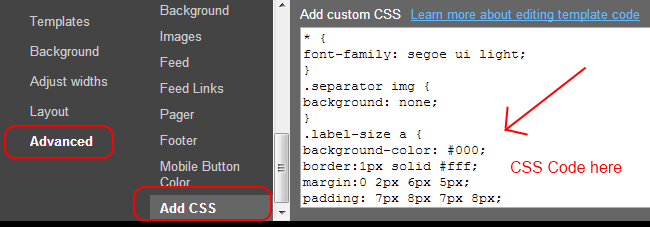
2. Click on Advanced and scroll down click Add CSS
3. Paste the code in that window and save it

 3. Adding menu 


1. Now come to page layout (above the template option)
2. Click on Add a Gadget(below the header )4
3. choose the HTML/JavaScript
4. Copy and paste the below code inside it


5.  Save your JavaScript file
 • Replace # with the links
 • Replace home, blog, contacts etc. with your link text which you want to appear on the menu bar
 • If you want change the background color of the menu then replace


one with below code line


Wednesday, 20 February 2013

How to design cloud labels in blogger/BlogSpot


Today I’m going to show how to design cloud labels in blogger/BlogSpot and as I told design a cloud label in blogger is simple and more effective in view and there are two ways to add this one to your blog one is through html editor other one is adding from customize option, both options under template menu. I prefer for adding CSS - CSS3 is customize menu there you won’t get confuse to find and tag or any things directly copy and paste CSS code there, in this tutorials I’m going to show both methods to design cloud labels


First Method:
Adding through “HTML Editor”
Step 1: Login to BLOGGER account and click this


Step 2:  Now select option Template and click


Step 3: In that click “Edit HTML” and click proceed


Step 4: Now find by press the combination of this “CTRL+F” and type “]]></b:skin>”
Step 5: Copy and paste the code above the tag “]]></b:skin>”

Second Method:
Adding through customize option
First two steps are same as the above after that
Step 3: Click “customize”


Step 4: Copy and paste the code


In the CSS code change the value for color and size of font and padding value last margins makes different look for you wish  


Sunday, 17 February 2013

CSS3 Advanced Menu bar with social widget and search bar


Today I’m going show how to advanced menu bar with social widget (contains menu share buttons and search bar) for your blogger blog. As you see the menu bar tutorials like this buttons this totally different and easy look rich effects. If you want this menu bar in your blog follow these steps to add


Step1:
            Login in to BLOGGER account click this


Step2:
            Now select the “Layout” from the options and click


Step3:
            Click Add Gadget and click on “HTML/JavaScript
Step4:
            Paste the below code empty the title bar

Step5:
            Change the values and color values as you wishing and now click save your “HTML/JavaScript”.
Then the awesome advanced menu bar appears in your blog   
ob

Friday, 15 February 2013

windows phone ui type social share buttons for your blogger


               Today I’m going to show to how to add Rss feed bar with social sharing buttons. This is just like windows phone incons widget. Your visitors can subscribe and share and rss news from this widget. It will help to get pageviews  for  your blogger and check it from demo link below. This will awsome for your blog and website also


All you need is follow this steps and it makes perfect widget
Step1:
                Login in to blogger account and click drop down


Step2:
                Now select “layout”  like below


Step3:
                Click Add Gadget and “HTML/JavaScript”
Step4:
                Paste below one of below code.

               
Step5:
                For social medi icons, you can chage the URLs as your link.
Replace VBDOTNETCOD with your feedburner ID
Step6:
                Now save your “HTML/JavaScript

windows phone type share buttons with subscribe button


Today I’m going to show to how to add Rss feed bar with subscribe box all in one place. This is just like windows phone incons widget. Your visitors can subscribe and share and rss news from this widget. It will help to get pageviews  for  your blogger and check it from demo link below. This will awsome for your blog and website also


All you need is follow this steps and it makes perfect widget
Step1:
                Login in to blogger account and click drop down


Step2:
                Now select “layout”  like below


Step3:
                Click Add Gadget and “HTML/JavaScript”
Step4:
                Paste below one of below code.

               
Step5:
                For social medi icons, you can chage the URLs as your link.
Replace VBDOTNETCOD with your feedburner ID
Step6:
                Now save your “HTML/JavaScript

Tuesday, 12 February 2013

how to add syntax highlighter for blogger vlog


         Today I’m going show how to add syntax highlight for your blogger, it’s simple to add syntax highlighter. Syntax highlight is rich if add to your blogger blog, its changes the way your blog look and make your blog nice and clean
Its has different supporting languages and scripting languages etc.
 All you need is go to their official site or copy and paste JavaScript code, one thing should you remind when you posting any code that code must be within these tags


And these tags are basic tags to highlight, if you use this tags its changes the font size and font its look some none effective, the syntax highlight is more color full and nice
For example for html code should be highlight then tags should be like this
Ex1:

Ex2:

 To add syntax highlighter for your blogger blog
Step1:
Login to Blogger account
Step2:
Go to template and click Edit html
Step3:
Now click proceed button
Step4:
Find this tag using Ctrl+F body tag ending
Step5:
Paste the below code before the end body tag

Step6:
Now Click on save template
Step7:
Whenever you syntax highlighter in your post just write code between this two tags


for different code blocks name check here http://alexgorbatchev.com/SyntaxHighlighter/manual/brushes/

Friday, 8 February 2013

Css3 Smooth Slideout Menu Bar For Blogger


In this tutorial im gonna  explain how  to  add  Css3 slide-out menu ba r for  your blog. This   is  also act like jquery menu  bar. This  menu  will  useful  who try to add  more  pages  for your blog.Im using Css3 and HTML for creating this widget.


Step1:
Go to blogger and login
Step2:
Go to blogger and click Layout
Step3:
Click Add Gadget and select 'HTML/Javascript
copy and Paste below code.


Step4:
Replace # with your links.
 Now save your HTML/Javascript'.

    You are done...

Vertical Hover Effect Css3 Menu Bar For Blogger


In this tutorial i'm gonna explain how to add vertical hover effect CSS3   menu bar for your blog. You can
change your  color  as your like. Im using juts  Css3 and HTML for these menu   bar.  In this tutorial You
can  get my all


Step1: Go to blogger and login


Step2:  Go to blogger and click Layout


Step3: Click Add Gadget and select 'HTML/Javascript


Step4: Copy and paste the code

Step5:
         Save Your "HTML/Javascript"